

What is Bukku?

Bukku is a cloud accounting app designed specifically for Malaysian SMEs. It simplifies financial tasks so that they can be managed by users with no accounting experience.
Invoicing, data entry, and financial reporting are all automated by the e-invoicing software tools. Invoices can be created and emailed or WhatsAppsed with a few clicks by the user. Bank reconciliation and fixed asset depreciation are also automated. Seamless e-invoice generation can save a lot of time for users and reduce manual invoicing processes.
Bukku boasts LHDN e invoice compliance with Malaysia’s taxation laws. It supports the LHDN’s e-invoicing requirement, where e-invoices can be issued within the system by users. It is also Peppol network-integrated, making it convenient to share e-invoices between different accounting systems.
As a cloud-based solution, Bukku is safe and agile. It is accessible using any internet-enabled device and maintain data security. It is 256-bit SSL encrypted and backed up every day.
Bukku offers an invoice plan for free and low subscription plans for its full accounting features. Subscription offers software support and future updates to ensure users stay current with legislation changes.
What Sets Bukku Apart from Other Accounting Software?
Bukku is an internet accounting software for Malaysian small and medium-sized businesses (SMEs). Simple and automated, Bukku is intended to simplify accounting for Malaysian business owners without accounting knowledge.
One of the finest features of Bukku is that it supports Malaysia’s LHDN e-invoicing requirement. With very little setup, electronic invoicing can be generated from Bukku and sent to the LHDN MyInvois portal. Both normal and self-billed e-invoice types are supported with validation status and QR code for scanning by customers.
Automatic data entry is also offered through Bukku’s “Digital Shoebox” facility. Receipts can be uploaded via WhatsApp, and Bukku will automatically extract pertinent information, reducing manual data entry. Bank reconciliations and fixed asset depreciations are also automated, saving time and reducing manual errors.
In terms of managing inventory, Bukku provides real-time monitoring of stock levels, unit prices, and stock values. Its perpetual inventory system ensures accurate and up-to-date records with no need for manual stock-taking.
Bukku, the cloud accounting software in Malaysia, usability is designed for non-accountants, with intuitive dashboards and over 50 financial reports. The reports include key indicators like sales, expense tracking, and cash flow that allow business owners to make solid decisions.
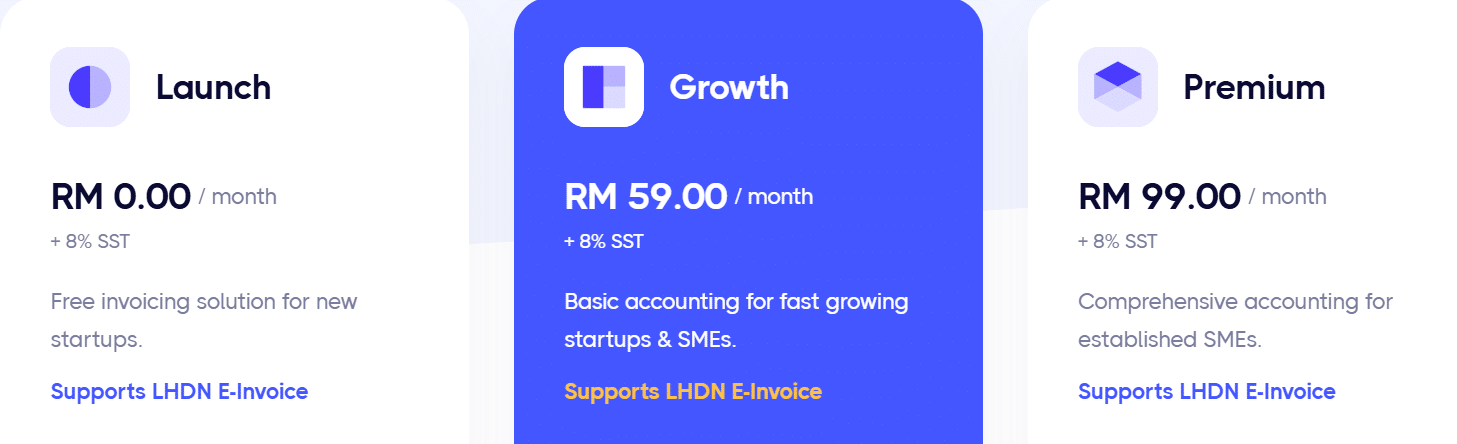
Bukku pricing is also affordable, with a free invoicing plan that includes unlimited e-invoice submissions. Paid plans that allow more premium features begin from RM59 a month, with additional features like inventory management, multi-user access, and comprehensive reporting.
Overall, Bukku is a great, easy-to-use, and affordable accounting system for Malaysian SMEs with automation, e-invoicing compliance, and real-time visibility to make finances easier to manage.
Check out the blog HERE on the top choices of E-Invoice Cloud Accounting Software in Malaysia.

Bukku Pricing and Plan Options
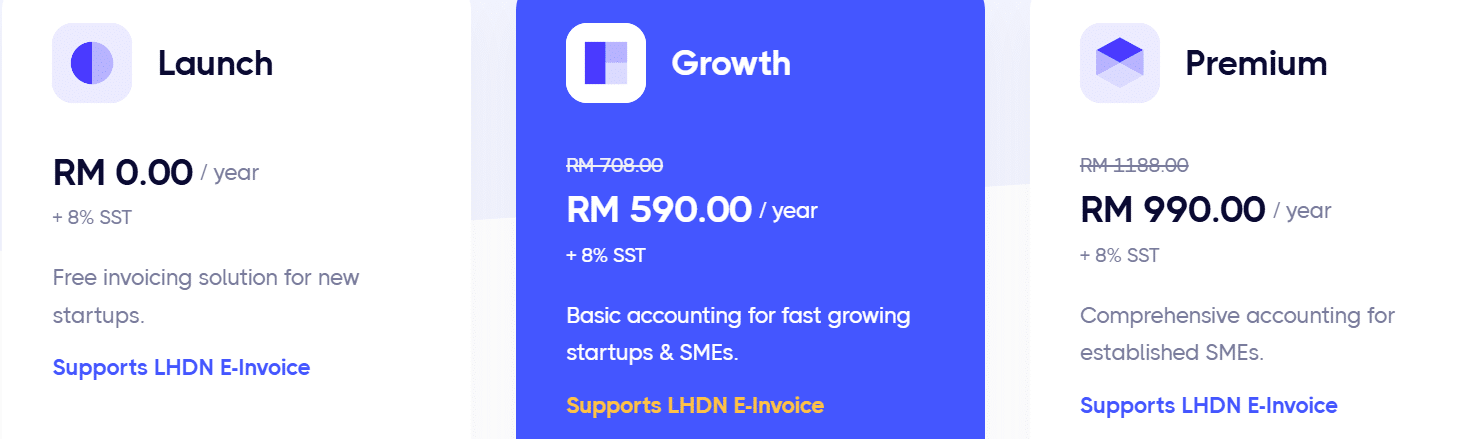
Bukku offers a free 30-day free trial to all new users. Below is the pricing information for monthly and yearly subscriptions; if required for a yearly subscription, the price is more affordable.
Monthly Fee
Yearly Fee
NGO Discount
Malaysian Eligible Non-Governmental Organisations are entitled to a maximum 25% discount.
Bulk Discount
Avail a bulk discount with your 5+ organization subscription to Bukku.
Bukku also offers several services to streamline business operations and the bookkeeping work.
Service | Price / pack / month (RM) |
Data Extraction | 14.90 |
14.90 | |
14.90 | |
Storage | 6.90 |
Additional Users | 6.90 |
Flow Orders | 14.90 |

If you want to get more information about each plan feature, you can check here. It ensures compliance costs for the Malaysian digital economy corporation.
Steps to Begin Using Bukku
Step 1: Create Your Bukku Account
Start by signing up for a Bukku account. Visit the Bukku website and follow the registration process to set up your account.
Step 2: Add Your Company
Log in and register your company on the Bukku platform. Fill in your company details accurately to establish them correctly.
Step 3: Set Up Your Company Profile
Customize your company details in Bukku. This includes filling up your company name, registration number, and other information that is required.
Step 4: Familiarize Yourself with the Interface
Get familiar with the easy-to-use interface of Bukku. Move through the dashboard to get used to the structure and facilities provided.
Step 5: Establish Initial Settings
Set up your initial configurations. It is all about loading opening balances and importing data from existing accounting solutions, if needed.
Step 6: Configure Inventory
Create your stock products and services. Correlate them with the appropriate accounts to make inventory handling easier.
Step 7: Familiarize Yourself with Basics
Utilize the “Getting Started” manual in Bukku. Learn how to record transactions, generate reports, and recognize quotas to utilize the software efficiently.
Check on the blog-> Top e Invoicing Solutions to Streamline Your Business Operations

