

Introduction: What is Xero E-Invoicing Malaysia?
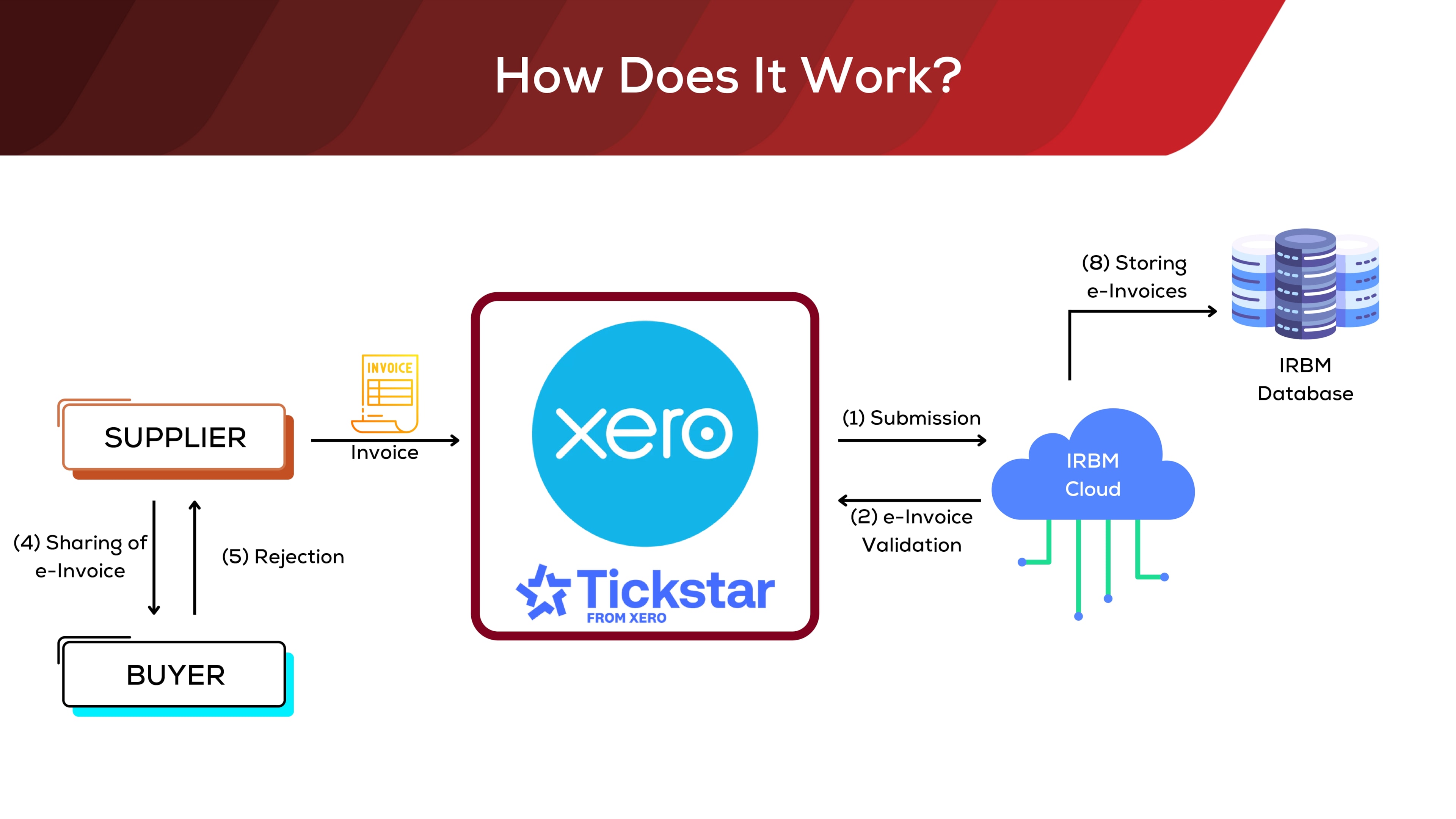
Xero E-Invoicing in Malaysia is an integration built to comply with Inland Revenue Board’s (IRBM) MyInvois Portal, using the Invoici gateway. With Malaysia transitioning towards mandatory e-invoicing by 2026, businesses must ensure their systems can issue, submit, and track digital invoices.
As a leading cloud accounting software and approved E-Invoicing Vendor by Malaysia Digital Economy Corporation (MDEC), The Xero e-invoicing system allows Malaysian businesses to:
- Xero ensures compliance by submitting e-invoices directly to MyInvois portal for validation purposes
- Track invoice status in real time
- Issue consolidated e-invoices and self-billed e-invoices
- Reduce manual data entry (even if you use the free MyInvois Portal) and ensure audit compliance
This guide covers everything you need to stay compliant, from e-invoicing requirements to workflow setup, using Xero to prepare for e-invoicing implementation.
👉 Explore our Xero E-Invoicing Setup Packages
Latest E-Invoicing Requirements: Malaysia E-Invoicing Implementation Timeline (based on YA 2022 annual turnover)
- Mandatory e-invoicing in Malaysia is based on YA 2022 revenue.
- According to the 6 December 2025 announcement by Prime Minister Dato’ Seri Anwar Ibrahim, businesses with annual turnover of RM1 million and below are exempt from Malaysia’s e-invoicing mandate.
| Revenue Size (Based on YA 2022) | Latest Compliance Date |
| Annual Turnover above RM100 million | 1st August 2024 |
| Annual Turnover between RM25 million – RM100 million | 1st January 2025 |
| Annual Turnover between RM5 million – RM25 million | 1st July 2025 |
| Annual Turnover between RM1 million – RM5 million | 1st January 2026 |
| Annual Turnover RM 1 million and below | Exempted |
| For businesses incorporated in 2023–2025 | Latest Compliance Date |
| When annual turnover exceeds RM1 million | 1st July 2026 |
How to Set Up Direct Integration of Xero Accounting Software and MyInvois Portal to Implement E-Invoice?
- Inland Revenue Board’s MyInvois Portal Registration as compliance purpose – To register Xero Software (Malaysia) Sdn Bhd as an intermediary in your MyInvois Portal
- Access to Invoici to setup integration between Xero Accounting Software and LHDN MyInvois Portal using your paid Xero Account.
- Xero has built the Application Programming Interface (API) with LHDN MyInvois Portal. Proper setup is required only to complete the seamless integration.
👉 Check on here (Refer to Step 1 and Step 2) about How to setup LHDN MyInvois Portal and Integration of Xero and LHDN MyInvois Portal
How to Activate Tracking Category for 45 Classification Codes in Xero?
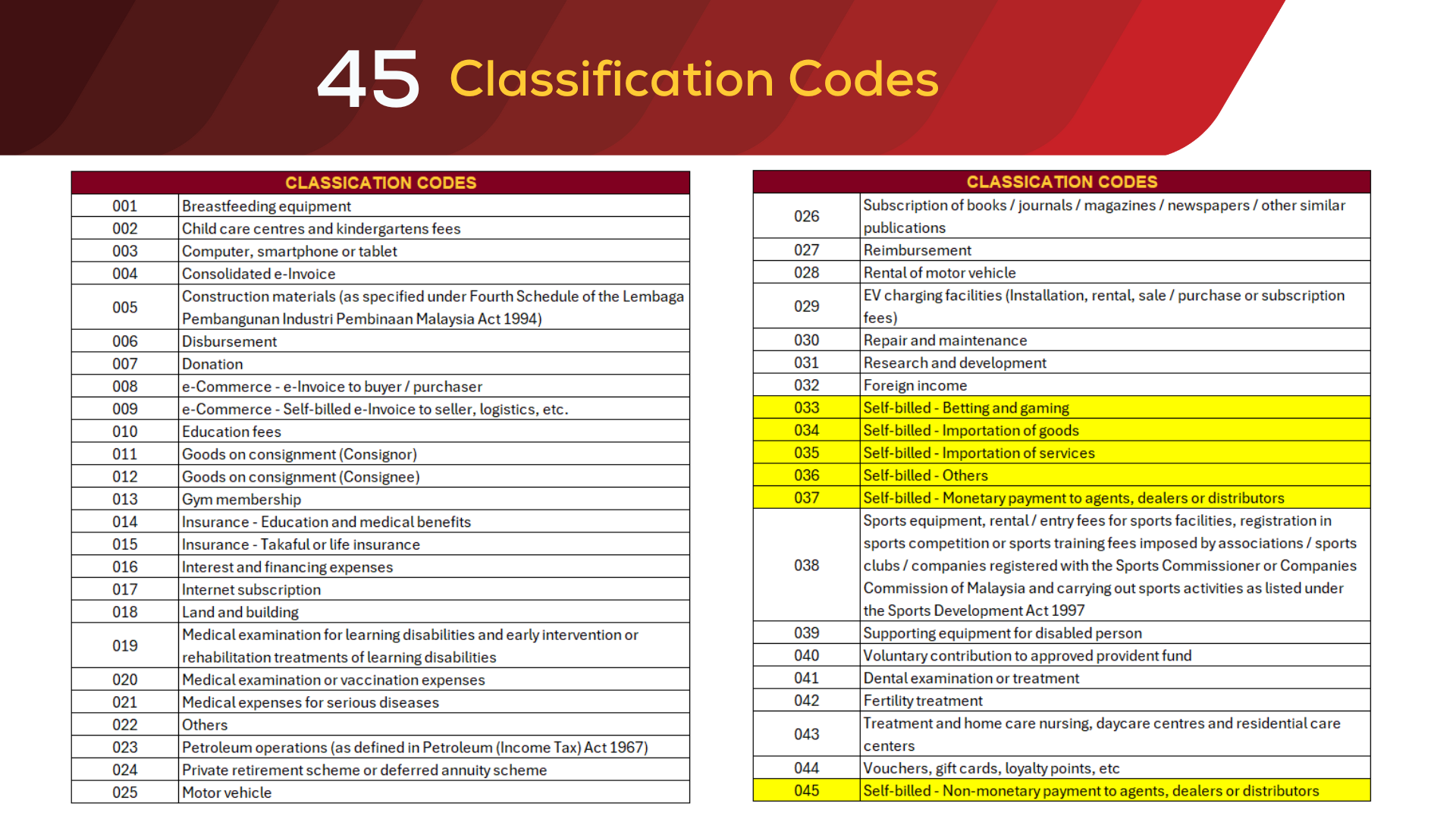
According to mandatory e-invoicing regulations and e-invoicing rules, there are various classification codes set by Inland Revenue Board to differentiate the type of transactions upon invoice creation or bills creation. Xero accounting systems as an e-invoicing solution, will create all the Classification Codes automatically under Tracking Category feature upon completion of setup direct integration of Xero and MyInvois Portal.
👉 Please take note that Tracking Category in Xero only allows maximum 2 Tracking options. If you have more than 2 currently, please remove one of it before setup the integration between Xero and MyInvois Portal.
👉 Check on here about E-Invoicing Malaysia: Understanding Classification Codes in Xero
Required Business Information of for your Customers and Suppliers
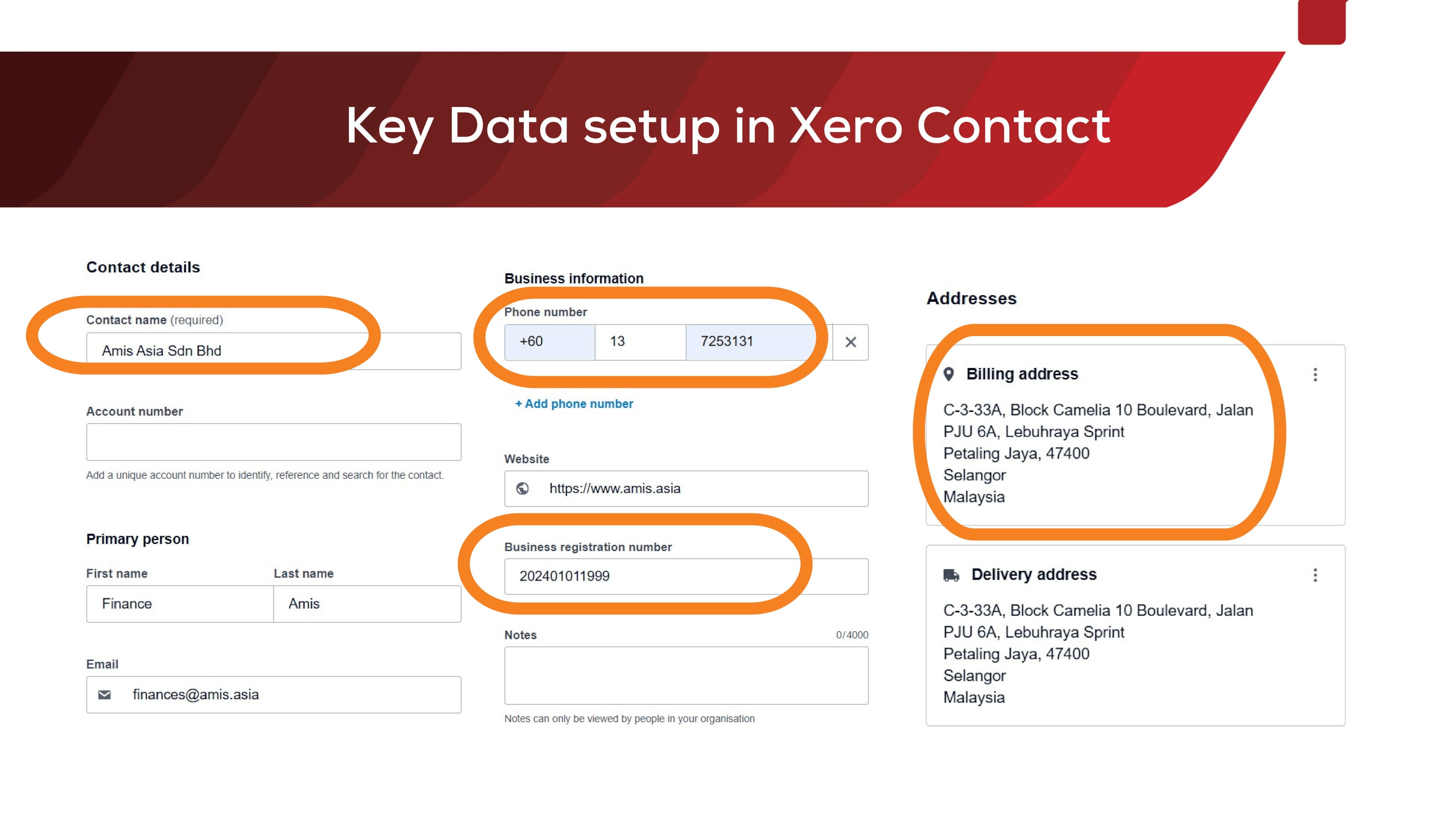
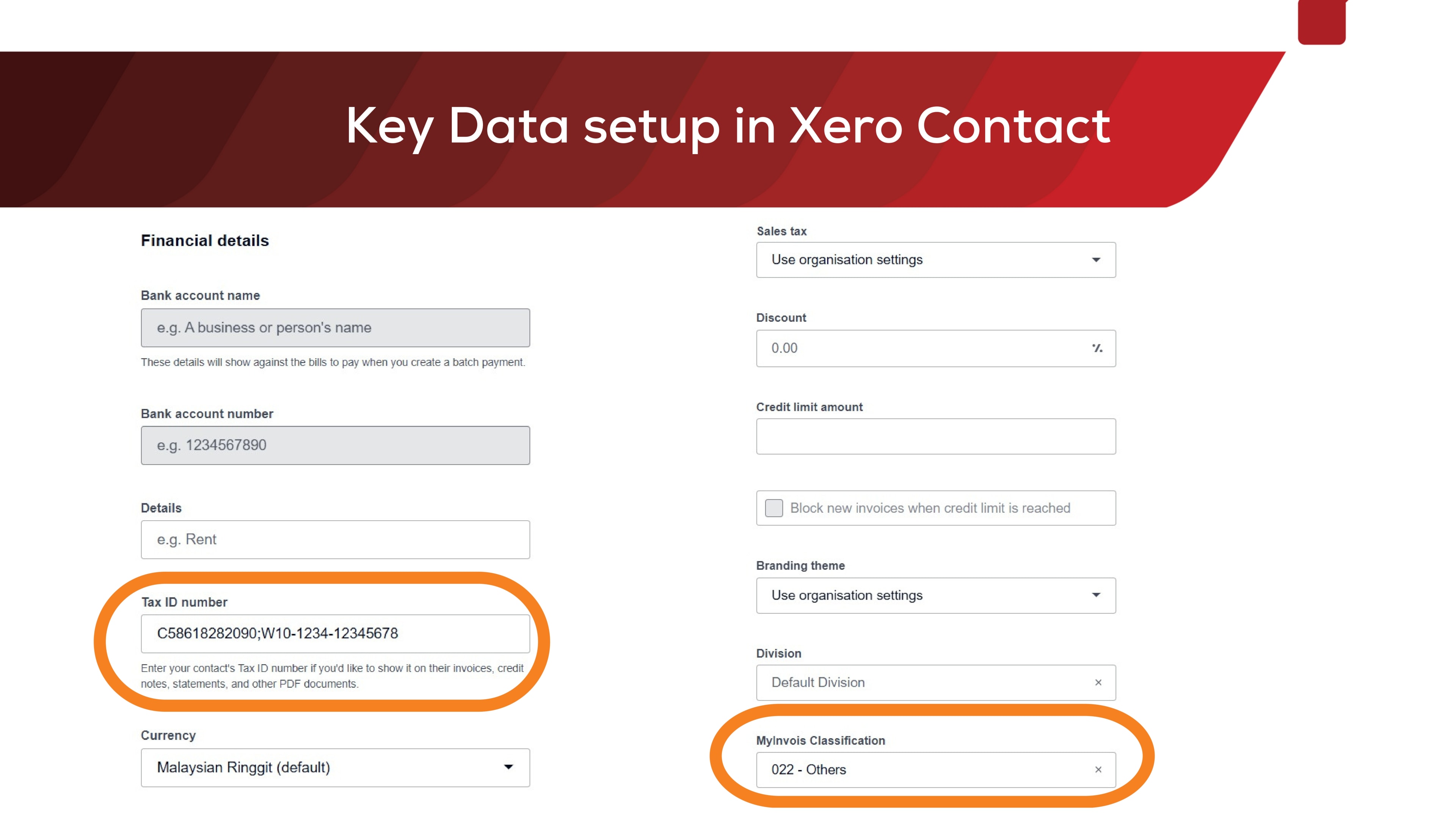
Following details are required to setup in Xero Contact for Customers and Suppliers.
- Tax Identification Number (TIN)
- Business Registration Number (BRN)
- Appropriate MyInvois Classification Code through tagging in the correct tracking category
👉 Common questions we received from our clients:
- How to solve the issue if my customer/supplier do not want to provide Tax Identification Number (TIN) and BRN to us
- My customer/supplier provided us TIN and BRN to us, but the e-invoice validation has error?
👉 Here is your solution -> How to Find TIN and BRN Numbers in Malaysia: Step-by-Step Guide for Individuals & Companies
How to Validate Consolidated E-Invoice (Sales invoices and CN) and Consolidated Self-Billed E-Invoice (Purchases, Expenses and Supplier CN)?
Consolidated E-Invoice is only allowed in the scenario as below:
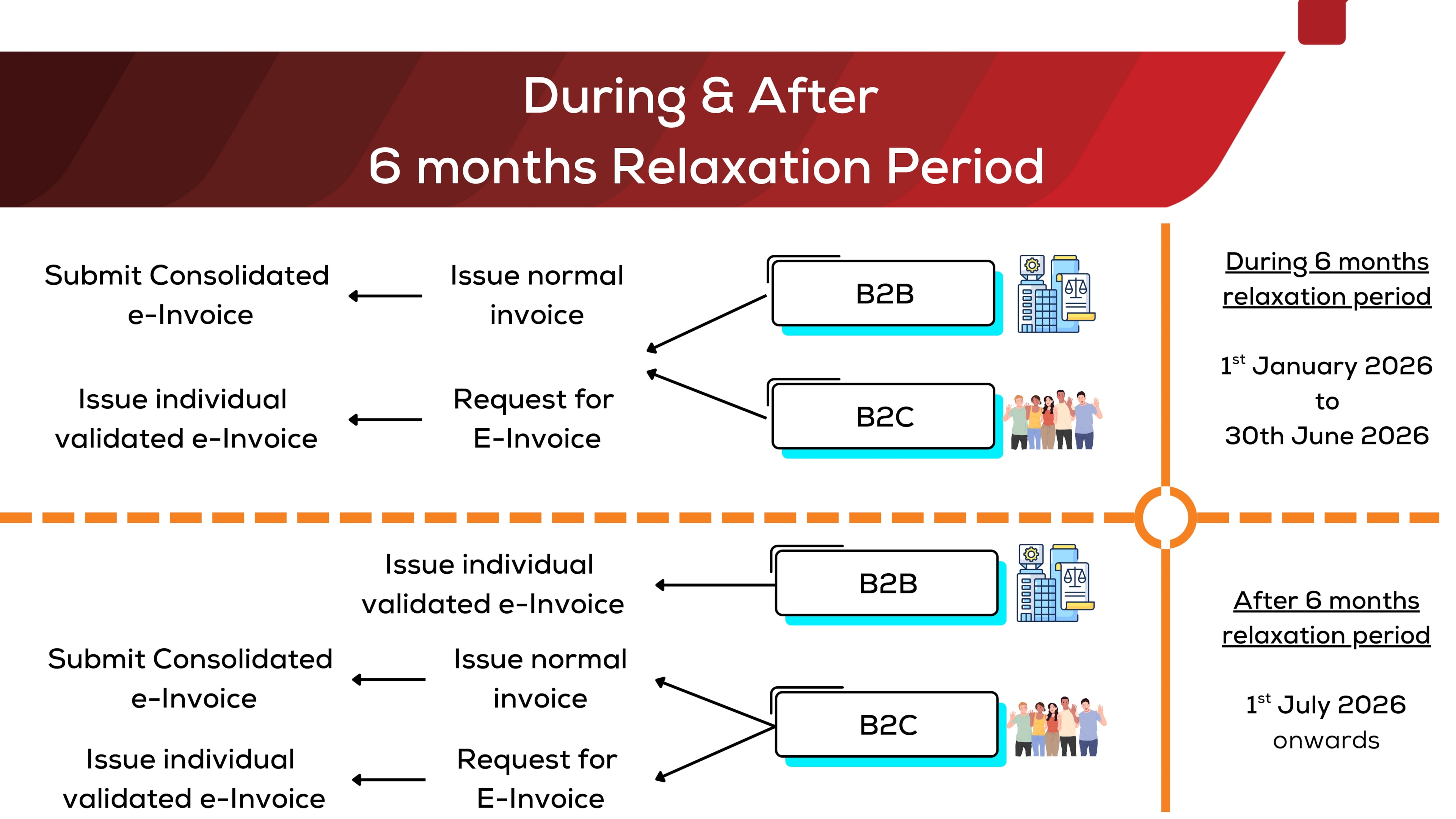
- During 6-months interim relaxation period for both Business to Consumer (B2C) and Business to Business (B2B) business model.
- Business to Consumer (B2C) model
6 Essential Steps of Validate Consolidated E-Invoice for your Sales Invoices and Credit Note
- Step 1 – Issue an invoice in your Xero Account and Issue a Credit Note in your Xero Account as usual, and ensure every line item in your invoice has the Classification Codes
- Step 2 – Xero will generated a consolidated e-invoice in Sales -> Invoice, falling under Draft Tab by 3rd of next month in night time (Do not approve or delete the draft transaction)
- Step 3 – Please check all the sales invoices and credit notes that consolidated by Xero automatically
- Step 4 – Click on 3 dot button on top right, select Email and click on Send to consolidated@invoi.ci for submitting e-invoices (consolidated)
- Step 5 – Once consolidated e-invoice has been validated, the draft transaction will be deleted automatically. Meanwhile, you may check the Status in History & Notes in your Xero to confirm it has been validated.
- Step 6 – Check the validated consolidated e-invoice PDF file with two methods
6.1 Contacts -> Select the contact name !! Consolidated eInvoice -> Go to Files -> You will see the PDF attached
6.2 Click on your company name on top left -> Files -> Choose Archive -> LHDN Validated Consolidated E-Invoice folder -> You will see the PDF attached
6 Essential Steps of Validate Consolidated Self-Billed E-Invoice for your Purchase Invoices and Supplier Credit Note
- Step 1 – Record a Bills to Pay in your Xero Account and Record a Supplier Credit Note in your Xero Account as usual, and ensure every line item in your invoice has the Classification Codes
- Step 2 – Xero will generated a consolidated self-billed e-invoice in Sales -> Invoice, falling under Draft Tab by 3rd of next month in night time (Please do not approve or delete this transaction)
- Step 3 – Please check all the purchase invoice and supplier credit notes that consolidated by Xero automatically
- Step 4 – Click on 3 dot button on top right, select Email and click on Send to consolidated-selfbilled@invoi.ci for submitting e-invoices (consolidated)
- Step 5 – Once consolidated e-invoice has been validated, the draft transaction will be deleted automatically. Meanwhile, you may check the Status in History & Notes in your Xero to confirm it has been validated.
- Step 6 – Check the validated consolidated e-invoice PDF file with two methods
6.1 Contacts -> Select the contact name !! Consolidated Self-Billed eInvoice -> Go to Files -> You will see the PDF attached
6.2 Click on your company name on top left -> Files -> Choose Archive -> LHDN Validated Consolidated E-Invoice folder -> You will see the PDF attached
👉 What is a self-billed e-invoice? Check on here about 9 Situations Where Buyers Must Issue Self-Billed E-Invoices in Malaysia
Xero Invoici Malaysia – How to Validate Individual E-Invoice (Sales Invoices) and Individual Self-Billed E-Invoice (Purchases or Expenses)?
Individual invoice issuance is compulsory to be validated as E-invoice for following scenarios:
- Every Business to Business (B2B) sales invoice after 6-months interim relaxation period
- Any sales transaction exceeded RM 10,000 per financial transaction
How to Validate Individual E-Invoice using Xero Invoici Malaysia?
To issue and submit e-invoices in Xero, below is the steps step-by-step guide:
- Step 1 – Ensure your customers’ contact in Xero already updated with the correct BRN, TIN and MyInvois Classification Codes (Ignore this step if this has completed earlier)
- Step 2 – Issue an e-invoice in your Xero Account and ensure every line item in your invoice has the Classification Codes
- Step 3 – Login to Invoici to search for the invoice under Invoices tab
- Step 4 – Click on Submit button – Submit the invoice to MyInvois Portal within 72 hours from the invoice date for validation (Click on Cancel button within 72 hours if required)
- Step 5 – Check the Status in Invoici OR History & Notes in your Xero to confirm it has been validated
- Step 6 – Send the validated e-invoice to your customer
How to Validate Individual Credit Note (CN) E-Invoice using Xero Invoici Malaysia?
To issue and submit e-invoices of CN in Xero, below is the steps step-by-step guide:
- Step 1 – Ensure your customers’ contact in Xero already updated with the correct BRN, TIN and MyInvois Classification Codes (Ignore this step if this has completed earlier)
- Step 2 – Issue a Credit Note in your Xero Account and ensure every line item in your invoice has the Classification Codes
- Step 3 – Login to Invoici to search for the invoice under Invoices tab
- Step 4 – Click on Submit button – Submit the invoice to MyInvois Portal within 72 hours from the invoice date for validation (Click on Cancel button within 72 hours if required)
- Step 5 – Check the Status in Invoici OR History & Notes in your Xero to confirm it has been validated
- Step 6 – Send the validated Credi note e-invoice to your customer
How to Validate Individual Self-Billed E-Invoice using Xero Invoici Malaysia?
To issue and submit self-billed e-invoices in Xero, below is the steps step-by-step guide:
- Step 1 – Ensure your suppliers’ contact in Xero already updated with the correct BRN, TIN and MyInvois Classification Codes (Ignore this step if this has completed earlier)
- Step 2 – Record a Bills to Pay in your Xero Account and ensure every line item in your bill has the Classification Codes
- Step 3 – Login to Invoici to search for the invoice under Self-Bill tab
- Step 4 – Click on Submit to MyInvois Portal for real-time validation (Click on Cancel button within 72 hours if required)
- Step 5 – Check the Status in Invoici OR History & Notes in your Xero to confirm it has been validated
- Step 6 – Validated self-billed e-invoices (PDF file) will be automatically generated into respective transaction.
How to Validate Individual Self-Billed Credit Note E-Invoice using Xero Invoici Malaysia?
To issue and submit self-billed CN e-invoices in Xero, below is the steps step-by-step guide:
- Step 1 – Ensure your suppliers’ contact in Xero already updated with the correct BRN, TIN and MyInvois Classification Codes (Ignore this step if this has completed earlier)
- Step 2 – Record a Supplier Credit Note in your Xero Account and ensure every line item in your bill has the Classification Codes
- Step 3 – Login to Invoici to search for the invoice under Self-Bill tab
- Step 4 – Click on Submit to MyInvois Portal for real-time validation (Click on Cancel button within 72 hours if required)
- Step 5 – Check the Status in Invoici OR History & Notes in your Xero to confirm it has been validated
- Step 6 – Validated self-billed CN e-invoices (PDF file) will be automatically generated into respective transaction.
How to extract Validated E-Invoice? (Automatically generated after submitted e-invoice through Xero Accounting System)
After completion of submitting e-invoice and all e-invoices validated in LHDN’s MyInvois Portal, Xero will automatically upload a PDF file into respective transaction.
If your validated e-invoice PDF file is missing, please contact us or Xero directly to seek for help.
How to Simplify E-Invoicing Compliance with Xero?
Strongly recommended to start submitting e-invoice individually for validation process even though you have 6-months interim relaxation period. This method enhance transparency in your small businesses or enterprises, most importantly e-invoicing implementation helps malaysian businesses to improve the Standard-of-Procedures (SOP) in invoicing processes that enabled faster payments from your customers through submit e-invoice on a timely manner.
You should only submit e-invoice (consolidated) for Business To Customer (B2C) business during relaxation period unless your business processes and manpower is insufficient to support the speed of data entry and submit e-invoice individually for validation.
E-Invoicing Solution Malaysia: When Xero Is Enough and When to Add Apps
Malaysia is moving to nationwide e-invoicing. Every business needs a simple way to issue, submit and track tax valid invoices. For many small and medium businesses, Xero alone is already a strong e-invoicing solution in Malaysia. It connects to MyInvois through Invoici, supports individual and consolidated e-invoices, and keeps a clean audit trail inside your Xero account.
Some businesses will still benefit from extra apps and an experienced Xero partner. This is common when you have many sales channels, many entities, or strict approval rules.
When Xero by itself is enough
Choose a Xero only setup if your operations are straightforward and you want fast compliance without heavy change.
- Single company with simple sales cycles – You create invoices in Xero and sometimes use consolidated e-invoices for B2C during the relaxation period. You can issue e-invoices, submit through Invoici to MyInvois, and view the validation status inside your Xero account.
- Manageable daily volume – Your finance team can handle the number of invoices each day. Contacts in Xero include BRN and TIN, items carry the correct classification code, and data entry stays light.
- Simple approvals – One or two people review invoices in Xero. You do not need complex routing rules that depend on amount or cost centre.
- Basic reporting needs – Xero reports cover your monthly close. You do not need advanced group consolidation or deep cost allocation.
If this sounds like your company, Xero covers the main needs. You can create invoices, submit e-invoices, follow tax compliance rules, tag the correct classification code, issue credit notes and self billed e-invoices, and use consolidated e-invoices where allowed. Moving away from paper invoices also cuts manual work and reduces errors.
When you will want add ons and a partner
Extra apps and a trusted partner make sense when your process or scale goes beyond Xero’s built in tools.
- High volume or many channels – You sell through point of sale, online store and marketplaces. Connectors can collect orders, map tax and enrich data before invoices are created in Xero. This cuts repetitive data entry and gives better project management over large data flows.
- Stronger AR and AP controls – You need routed approvals, three way matching or vendor onboarding. Accounts payable and accounts receivable apps enforce policy and help ensure compliance. They also create a stronger audit trail.
- Complex billing models – Your business uses usage based, milestone or subscription billing. A billing app creates the correct schedule and then pushes clean invoices into Xero for validation.
- Deeper analytics and group reporting – You want multi entity dashboards and cash flow forecasting across subsidiaries. A light analytics tool can sit on top of Xero to support better decisions.
- Orchestrated workflows – You need alerts, escalations and hand offs across teams. A simple workflow tool moves you from people dependent to process driven and lowers risk.
In short, start with Xero if you are small to mid sized and your process is simple. Add apps as your business operations grow more complex. Work with a Xero partner in Malaysia to design a clear blueprint so every tool has a specific job and nothing overlaps.
Where Xero Handles It Natively and Where Partners Help
What Xero does well on its own
- Invoice creation and validation – Build the invoice in Xero, tag the right MyInvois classification code using tracking categories, then submit for validation through Invoici. Status is visible from your Xero account.
- Consolidated and self billed flows – Use consolidated e-invoices where allowed and self billed e-invoices for purchases and expenses. Xero helps package and track these items.
- Credit notes and adjustments – Create credit notes that link back to the original invoice. Validation keeps the audit trail clean.
- Compliance records – Timestamps, status history and validated PDFs sit with the related transaction. This makes checks for tax compliance easier.
Where a partner and add ons usually add value
- Master data cleanup – Standardise customer and supplier records. Make sure TIN and BRN are correct. Clean product and service lists so invoices post correctly the first time.
- Volume and channel complexity – Plan integrations for point of sale, e-commerce and marketplaces. This creates invoices with the correct tax logic and category tags and removes most manual data entry.
- Controls and approvals – Set approval matrices and segregation of duties. Handle exceptions with a clear path so nothing gets stuck.
- Change management and training – Create written SOPs, roles and dashboards. Help teams follow the same e-invoicing workflow every time.
- Analytics and board packs – Combine validated e-invoice data with margin and cash metrics to support faster and better leadership decisions.
A good partner aligns these steps with your growth plan so you only buy what you need right now and can expand later without rework.
Choosing a Xero Partner in Malaysia for Implementation and Training
The best partner is the one who understands your business and delivers results you can measure. Use this simple checklist.
- Real e-invoicing experience in Malaysia – Ask for case studies that show consolidated e-invoice, self billed e-invoice and large contact imports with BRN and TIN. Request sample SOPs and training slides.
- Clear compliance method – The partner should explain how their plan will ensure compliance with LHDN rules. This includes contact data standards, classification code governance, timing of submissions and how to handle rejected invoices. They should be up to date on the latest announcements and thresholds.
- Integration skills – Even if you start with Xero only, confirm the partner can connect point of sale, e-commerce, expense or approval apps when you are ready. Your stack should scale without a rebuild.
- Training that people can use – Good Xero training in Malaysia is role based. Sales, finance and managers should each get what they need. Teams should learn to issue e-invoices, read validation statuses and fix common errors.
- Written SOPs – The partner should define who does what and when. This includes naming rules, user permissions and checklists. New staff should be able to follow the guide without help.
- Measurable outcomes – Agree on targets before you start. Examples include lower data entry time, higher first pass validation rate, faster time to invoice and fewer hours to prepare for audit. Review these every month until you reach a steady state.
- Reliable support – Confirm the support hours, response times and how updates will reach you. E-invoicing rules change. Your partner should alert you and update your SOPs.
Watch out for problems
Be careful if a partner pushes tools without a process map, uses the same template for every industry, or stops training before frontline users are confident.
Simple takeaway
If your needs are simple, Xero can be your complete e-invoicing solution in Malaysia. You can go live quickly and keep costs low. If you are scaling channels, entities or control requirements, add the right apps and work with a skilled Xero partner in Malaysia. This will help you ensure compliance, speed up your cycle time and give leaders clean data for confident decisions.
Why Xero E-Invoicing is the Preferred Solution for Malaysian Businesses
Switching from paper invoices and traditional paper-based invoice methods to Xero’s e-invoicing solutions is a strategic move for any business aiming to grow in Malaysia’s digital economy. Xero’s seamless integration with the MyInvois Portal helps ensure compliance with LHDN’s requirements while reducing data entry and processing delays.
By using your Xero account to issue e-invoice documents, businesses not only stay compliant but also improve cash flow through faster processing. Recognized by the Malaysia Digital Economy Corporation (MDEC), Xero’s key feature continues to support businesses in achieving tax compliance without the hassle of manual workflows.
Combined with project management tools and automated tracking, Xero offers a comprehensive approach to e-invoicing that is ideal for small and medium-sized enterprises.
Conclusion – Make Xero e-Invoicing Malaysia Your Compliance Advantage
With Xero’s end-to-end e-invoicing capabilities, Malaysian SMEs and mid-market firms can turn compliance into a competitive edge. Xero streamlines Xero e-invoicing malaysia setup from MyInvois registration and Invoici Malaysia integration to accurate xero e-invoice submission, including consolidated and self-billed workflows so you can meet LHDN e-invoicing Malaysia rules without heavy manual work. The result is simpler processes, fewer errors, faster validation, and clearer audit trails.
As the e-invoicing Malaysia 2026 mandate approaches, Xero helps you ensure compliance with Malaysia’s e-invoicing requirements while improving day-to-day operations: less data entry, consistent tax tagging, and real-time status tracking in one system. Whether you’re an SME planning your first xero e invoicing setup malaysia or a growing company refining your e-invoicing workflow, Xero provides a scalable, secure foundation—supported by local partners for implementation, training, and ongoing optimization.
Ready to move from “obligation” to “opportunity”? Deploy Xero now and align your finance team, processes, and controls for compliant, efficient, and future-proof invoicing.
